|

|
||||
How To Pay Home Restorations
|
 |
We use PayPal for our credit and debit card processing because it's very secure -- we don't
even get to see yourcard number. It's also extremely easy to
use.
You DO NOT NEED A PAYPAL ACCOUNT TO PAY US BY
CREDIT OR DEBIT CARD.
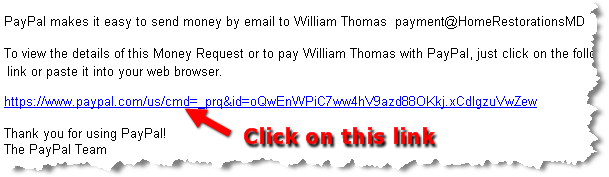
1) First, we'll send an email to you (like the one below) via PayPal
with a link enclosed. Please click on the blue PayPal link, as shown in the screenshot
below.
|
|
2) Next, your browser will open and you'll see a "Enter Payment Information" screen like the one below. If clicking the link doesn't work, copy and paste the blue PayPal link into your browser, and click "Go".
|
|
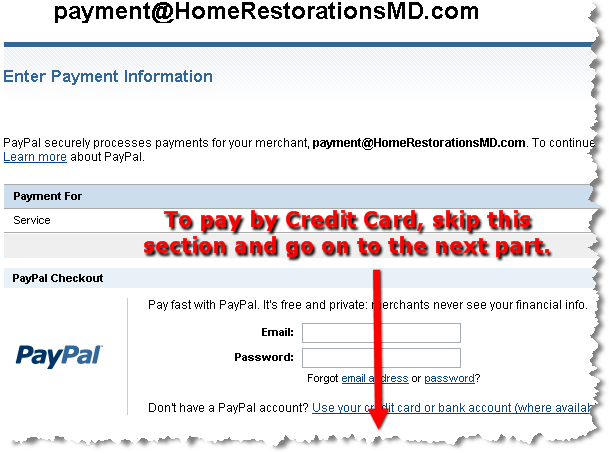
3) Skip over the first section, as above. The next section looks like the one below. Click on the radio dial that says "No PayPal account? Use your credit card . . . "
|
|
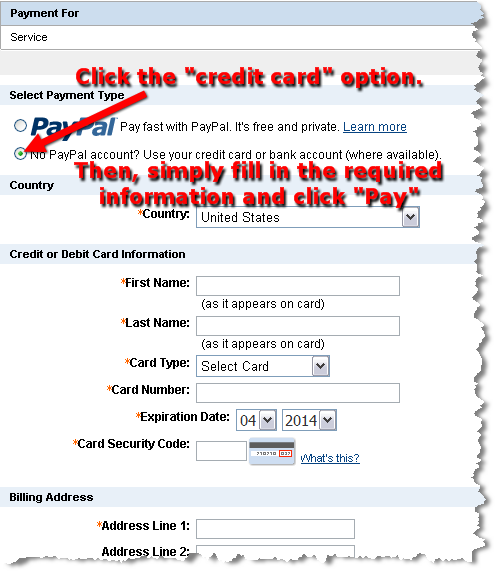
4) Then, simply fill in your Credit or Debit Card information, click "Pay", and follow the rest of the directions from PayPal. That's it!
Thank You for your business and for paying by Credit or Debit Card using PayPal,


How to Pay By Credit or Debit Card
|
Terms and Conditions | Privacy Policy | Contact
Us |